
CSGO GC Inventory Editor — Full Guide
This guide explains how to use the CSGO GC Inventory Editor to manage, edit, and customize your CS:GO inventory with ease.
Initial Setup
When you launch the application for the first time, it will automatically prompt you to select your inventory.txt file.
This file is located inside your CS:GO GC folder:
\Steam\steamapps\common\csgo legacy\csgo_gc\inventory.txt
Browsing & Editing Items
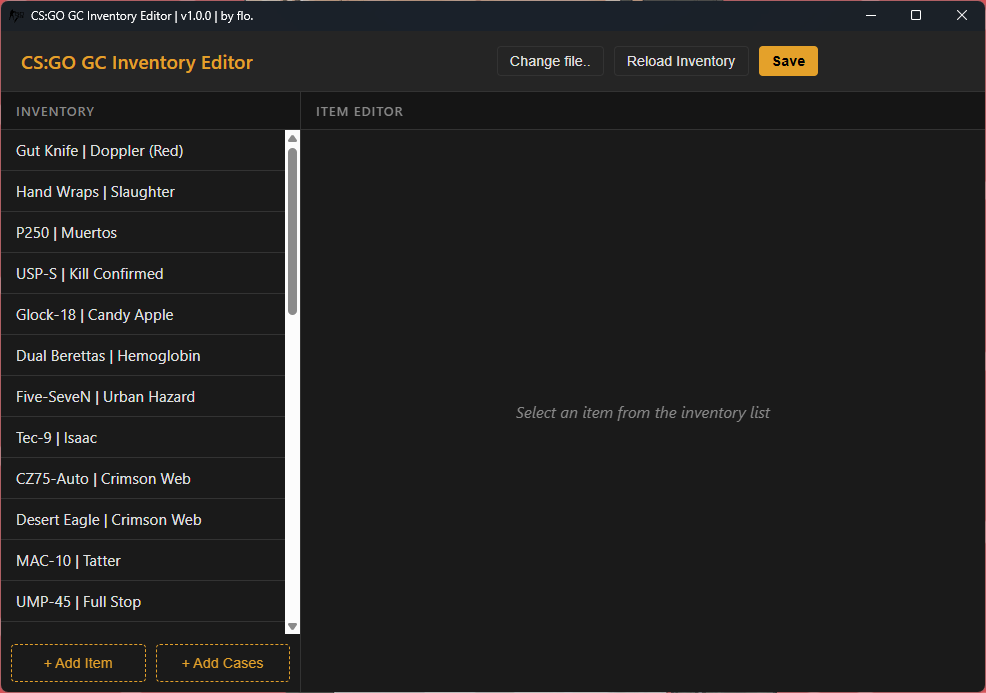
The left panel displays your entire inventory. Simply click any item to view and edit its properties in the main editor window.
- Edit Properties: Change skins, floats, patterns, rarity, quality, and more.
- Live Preview: Some versions of the editor support previewing item data instantly.
Adding & Removing Items
The editor includes the full CS:GO item database, allowing you to add anything:
- Weapons
- Knives
- Gloves
- Agents
- Pins
- Stickers
- Music Kits
- Cases & Keys
You can also remove unwanted or duplicate items with a single click.
Saving & Syncing
Once you're done editing:
- Save: Writes all changes to your
inventory.txt. - Reload Inventory: Refreshes the editor if you made changes in-game or manually edited the file.
Switching Inventory Files
If you want to edit a different inventory later, click the "Change file.." button in the top bar.
This allows you to swap between multiple accounts or setups easily.
Tips for Best Results
- Always keep a backup of your
inventory.txtbefore making major changes. - Use the editor inside its own folder to avoid missing dependencies.
- If the game doesn't show your changes, restart CS:GO and reload the editor.
Screenshot
More features and updates will be added as the tool evolves.